

What is a media room? It’s where the kids play games, someone watches football, and everyone gathers for a movie. You still use the room as usual, but with a better screen and sound.
A home theater takes a different approach. It’s built mainly for watching films, with more focus on lighting, sound, and seating.
Table of Contents
Understanding the Media Room Definition
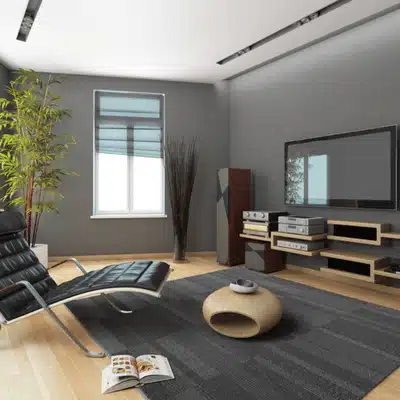
A media room doesn’t have to be a separate room. Many homeowners turn their living rooms or spare bedrooms into spaces where they can enjoy movies, games, and music.
Most setups include a 4K TV, surround sound speakers, and comfortable seating. Some also have smart lights, streaming devices, and shades that help block sunlight.
The good thing is that you can start small. A better TV and sound system can make a big difference without changing the entire room.
What Makes a Home Cinema Room Different
A home cinema is closer to the experience of visiting a movie theater. It usually has a large screen, dark walls, and seats facing one direction.
Sound and lighting also get more attention. Blackout shades keep sunlight out, while acoustic panels help reduce echoes.
Unlike a media room, a home theater isn’t usually used for much else.
Key Differences in Design and Functionality
Space Requirements and Layout
Media rooms work in existing living areas. You don’t need a separate room. A corner of your family room or part of your basement can become your entertainment space.
Home theaters need their own dedicated theater space. Plan for at least 300 square feet if you want proper room size for seating and screen distance. The isolation matters for both light control and acoustics.
Purpose and Daily Uses
A media room handles multiple jobs. Kids play video games in the afternoon. The family watches the big game together. Friends come over to chat with something streaming in the background.
A home theater room serves one function: delivering the best possible viewing experience. You dim the lights, silence phones, and focus on the screen. Every visit feels like an event.
Technology and Equipment
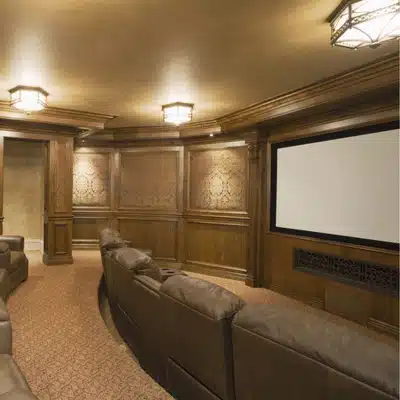
Media rooms use lighter setups. A streaming device, game console, AV receiver, and TV cover most needs. The gear stays hidden in cabinets to keep things tidy.
Home theaters go all-in on equipment. High-end receivers, multiple amplifiers, calibrated projectors, and reference-grade speakers fill equipment racks. Some setups even include dedicated media servers for your collection.
Sound and Lighting Control
Media room lighting balances entertainment with everyday life. Normal ceiling lights, lamps, and maybe some dimmer switches handle most situations. You can darken things for movies but don’t need total blackout.
Home theater lighting controls every photon. Blackout curtains, automated shades, and carefully placed accent lighting create the right ambiance. Complete darkness is standard.
Comfort and Furniture
Media room furniture stays flexible. Sectionals, bean bags, and moveable chairs let people gather however they want. The layout works for watching movies or having conversations.
Theater space comfort comes from fixed recliners facing the screen. One or more rows lock in place. Raised platforms ensure clear sight lines for everyone.
Making Your Choice: Benefits and Comparison
Flexible OptionMedia Room
Space & Location Works in existing living areas. No dedicated room needed. Natural light is welcome. Purpose Multi-purpose hub for movies, gaming, socializing, and everyday activities. Furniture Flexible seating. Sectionals and recliners that adapt to different uses. Technology Large flat-panel TV or retractable projector. Good sound system with in-wall speakers. Budget Lower upfront costs. Can upgrade gradually over time. More budget flexibility. Best For Families with varied interests. Daily use. Social gatherings. Limited space.Premium OptionHome Theater
Space & Location Dedicated enclosed room. Isolated from other living areas. Complete light control. Purpose Single-focus cinema experience. Maximum immersion for movies and shows only. Furniture Theater-style seating. Fixed rows of recliners. Raised platforms for clear sight lines. Technology Large projector screens (120+ inches). High-end surround sound. Acoustic treatments. Budget Higher upfront investment. Specialized construction and equipment. Premium quality. Best For Movie enthusiasts. Special occasions. Available dedicated space. Maximum quality.
Media Room
Home Theater
Which Option Fits Your Lifestyle?
Media Room
If the family already gathers in the living room, why change that? You can improve the sound first and leave the bigger upgrades for another time.
Home Theater
A home theater makes more sense if watching movies is your main hobby. You’ll have more freedom to plan the sound, seating, and lighting around the screen.
Which Option Fits Your Lifestyle?
Think about how you’ll use the room most days. The best setup is one that suits your space and budget.
Choose a Media Room If:
- You want one room for several activities.
- Your family enjoys movies, sports, and games.
- You’d rather keep your current furniture.
- You want to spread upgrades across several months.
Choose a Home Theater If:
- You have a spare room to use.
- You prefer watching movies without outside light.
- You want fixed seating and surround sound.
- You’re ready for a larger installation project.
Media Room Ideas and Upgrades
You don’t need to buy everything at once. Start with the parts you’ll notice most, such as the screen, speakers, and seating.
Smart lighting is another useful upgrade. With Control4, supported lights, shades, and entertainment devices can work together.
Here’s what different media room budgets can cover.
| Setup | Estimated Cost | What’s Included |
| Basic DIY | 2,000–5,000 | TV, soundbar, basic lighting |
| Custom Installation | 10,000–20,000 | Surround sound, wiring, smart controls |
| Premium Setup | 25,000–50,000+ | High-end sound, custom features, room upgrades |
These are broad U.S. planning ranges based on cost guides from Angi and HomeGuide. Your final price depends on equipment, wiring, and room size.
What Is a Media Room? DIY Living Room Conversion
Already have a living room you’d like to upgrade? You can make several changes yourself before bringing in an installer.
- Choose your screen wall. Find a spot where sunlight won’t cause too much glare.
- Check the view from your sofa. Sit in your usual spot and measure how far away the TV will be.
- Set up the TV. A sturdy stand works fine, or you can mount the screen if the wall allows it.
- Listen to your current speakers. If voices sound muffled, try a soundbar or move up to a 5.1 system.
- Deal with bright windows. Thick curtains help during the day. Dimmer switches are handy at night.
- Listen for echoes. A large rug or heavy curtains might help before you spend money on acoustic panels.
- Sort out the cables. Keep loose wires behind furniture and clear of places where people walk.
You can handle most basic upgrades yourself. For new electrical outlets or wiring inside walls, hire a qualified professional.
Transform Your Entertainment Experience Today

A good media room doesn’t need to look like a movie theater. It just needs to feel comfortable and work the way you want.
My Custom Integrators helps Central Texas homeowners plan screens, sound systems, lighting, and smart home controls.
Explore our home theater installation services to see what’s possible for your home.
What’s the main difference between a media room and home theater?
A media room is used for entertainment and everyday activities. A home theater is built mainly for watching movies. Media rooms are usually easier to fit into an existing home.
Can I have good surround sound in a media room?
Yes, you can enjoy surround sound without having a dedicated theater. A 5.1 speaker system is a good starting point for many living rooms. Speaker placement matters, so follow Dolby’s setup guidance.
Which costs more to build?
Home theaters tend to cost more, especially when you’re starting with an empty room. Things like tiered seating, blackout shades, and extra speakers can push the bill up. With a media room, you may already have most of the furniture you need.
How much space do I need for each option?
There’s no set room size for either one. A modest living room can still fit a good TV and compact speakers. For a home theater, think about how many seats you want and whether there’s enough space to walk around them.
What are the best 5.1 speaker systems for media rooms?
The Klipsch Reference Theater Pack is worth considering for smaller rooms. Polk’s Monitor XT speakers are another option for building a 5.1 setup. Both need a compatible AV receiver for wired surround sound.
How much does a custom media room installation cost?
For a custom media room, expect to budget around $10,000 to $20,000. If you’re doing most of the work yourself, $2,000 to $5,000 may be enough for a basic setup. More costly projects can pass $25,000 once you add custom wiring, better speakers, and other built-in features.
What smart home automation integrates best with media rooms?
Control4 is a strong option for homes with several smart devices. You can set up a movie scene that dims the lights and turns on supported entertainment equipment. Just make sure your TV, speakers, and other devices are compatible.
Do I need acoustic panels in a multi-purpose media room?
Not every media room needs acoustic panels. Rugs, curtains, and upholstered furniture may be enough to reduce noticeable echoes. If the room still sounds harsh, panels near the main sound reflection points can help.
Maybe your living room only needs a better TV and a few changes to the lighting. Or perhaps you’ve been thinking about a full sound and screen upgrade for a while. Either way, contact My Custom Integrators to talk through your plans and get a quote.